Showing posts with label notebook. Show all posts

Thursday, 22 November 2012

Gift Guide: What to Get Friends, Staff and Customer

Evernote Smart Notebook by Moleskine, $24.95

Available in a pocket size and notebook size (for $29.99), this Moleskin pad uses either lined or "squared" pages. Using the Evernote Camera App, you can snap a photo of the page and transfer the notes as searchable text to the app (iPhone or Android). Price includes a three-month subscription to Evernote Premium

Hydros Bottle, $27.99

You don’t really want to know what is in an ordinary glass of tap water. And even if you use one of those water machines at the office, bacteria can build up on the dispenser. This water bottle uses a filter on the bottle itself that removes most contaminants like chlorine and chloramine.

Segura Viudas Reserva Heredad, $25

Nothing says “thanks for being an awesome employee” like a bottle of wine. Freixenetusa.com imports cava sparkling wines from the Sant Sadurni d'Anoia region near Barcelona. This blend, aged on lees for about three years, comes from hand-picked grapes and vinified from nine different wines.
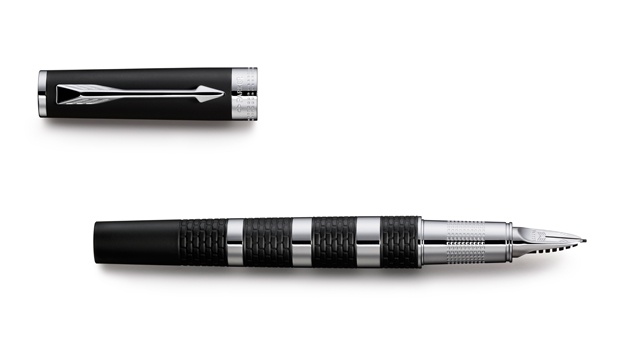
Parker Ingenuity Pen, $190

A bit pricey but built for a lifetime of use, this high-end writing instrument uses a “smart glide” tip that adjusts to your writing style. The grip has a texturized rubber finish, and there is a gold finish on the arrow and tip. Bonus: The pen comes in a stylish gift box. Refill cartridges cost $8 each.

Biscoff Holiday Favor Boxes, $22.95

This set of four gift boxes, meant to hang on a tree, includes four cookies in each box. They’re caramelized crisps, originally served on Delta airlines as a coffee accoutrement. To buy them in bulk, there’s also an eight-box set available at Biscoff.com for $36.95.

Marbles JuggleFit, $24.99

Minnesota-based Marbles Brain Store makes games that improve gray matter. Studies show that learning how to juggle can improve brain cell activity in one week. This kit includes three scarfs for practicing and three heavier balls, plus a training DVD and a handy tote.

The Fruit Guys TakeHome Case, $26

This eclectic mix of fruits and nuts comes in a few different sizes to fit your budget. There are mini packs with five or eight pieces of fruit all the way up to a bountiful 36-piece pack with four bags of nuts. There’s also an organic veggie case with avocados, garlic, sweet potatoes, and kale.


Wednesday, 31 October 2012

6 Ways Windows Surface Beats the iPad

It's not (yet) an iPad killer, but the new Windows tablet does have a few impressive features for business.

In a perfect world, the better gadget would always win. For the brand new Microsoft Surface RT tablet there is no question Microsoft has decided to embrace the world of touch computing, hoping to dethrone the mighty iPad and attract mobile users in droves.

We are not yet ready to say Surface RT is better than the iPad. But there are some significant features that make it attractive for business.

1. Behold, the Keyboard

You can obtain a portable keyboard for the iPad, but the Surface RT includes one that is downright brilliant. Some might argue it is not that different from the soft keyboard on the iPad, and I've seen some speed typers at airports who make me wonder how they do it. The Surface RT includes a cover that doubles as a keyboard, and there are two surprises. One, even though the keyboard only has slightly raised keys, I can type much faster and more accurately on it than the iPad. Also, there's a stand on the back of the Surface RT, so you can fold off the cover, prop up the tablet, and start typing like you are on a laptop. Brilliant. Microsoft offers a rainbow of colors and the keyboard/cover snaps into place with a click.

2. Free Office Apps

Microsoft includes the Office 2013 apps for the Surface RT for free. That's a major plus for business owners who decide to deploy the device to employees. The suite uses a fresh, clean-cut design that runs smoothly on the mobile processor that powers the Surface RT. There are the big three--Word, PowerPoint, and Excel--plus the 2013 version of OneNote, a collaboration and info gathering tool. So far, what I like best about Word is that you can quickly save a document to Microsoft SkyDrive for cloud storage, and that the app runs stable and with familiar tools. Plus, no install programs to run.

3. Smart Store

There are plenty of Windows Store naysayers, and I'm not exactly a diehard fan. There are many apps missing, including a few of my favorites like SproutSocial. But while the store is missing important apps, there is one benefit: The apps you will find are designed to run fast and reliably on the RT tablet. I tested Skype, the Kindle e-reader, the Zinio app, and several others. The apps use the same tile approach of Windows 8 for touch apps with plenty of open space and finger-aware buttons. Presumably, there will be touch apps for many popular desktop programs, including Photoshop and many others.

4. Connections, Natch

Microsoft has included several options for connecting the tablet to other gadgets. The RT supports Bluetooth 4.0 so you can connect a new crop of devices like digital pens that can automatically adjust pressure sensitivity. There's a USB port, which means you can attach keyboards and mice, webcams, and just about any add-on that does not require a driver designed only for the Windows 8 desktop version. Under the stand, you'll even find a microSD port for loading pictures and videos.

5. Battery Life

It's easy to become a slave to re-charging. Hunting for outlets at airports, connecting up as soon as you walk into a hotel room. Since the RT lasts almost 10 hours, you might find that re-charging is not as much of an issue. Ten hours is enough to get you to your next meeting after jumping off the plane, and that's really all that matters. I also found I did not have to dim the display or turn off features to get good battery life.

6. Screen Tech

The screen on the Surface RT has a sharpness that I don't see on Android tablets. At 400 nits, it is also quite bright and readable even outside. The resolution is more in line with a typical laptop, but Microsoft has used some type-smoothing tech to improve readability. Swipes and gestures on the RT worked reliably every time, and colors looked outstanding for games and photos. In many ways, the screen is the most important hardware element because it is what you look at all day. The iPad 4, announced last week, is arguably more crisp with a higher resolution, but the Surface RT gets major points for brightness and text clarity.